
푸잉이의 기술블로그
[Day3] Certified Kubernetes Administrator (CKA) with Practice Tests 본문
[Day3] Certified Kubernetes Administrator (CKA) with Practice Tests
data고수 2023. 1. 5. 04:4828강
Recap-ReplicaSets
Controller는 쿠버네티스 오브젝트를 모니터링하고 반응하는 프로세스
Replica & replication controller 필요한 이유
- 1) 고가용성
이유)
- pod 안에 여러 인스턴스를 실행하는데 도움이 됨
- Replication controller는 항상 명시된 pod의 수로 running 함
- pod가 하나 있어도 Replication controller는 새로운 pod를 생성하는데 도움 줌
- 2) Load Balancing & Scaling
이유)
- 부하를 분산하기 위해 여러 pod를 생성해야함
- 여러 pod에서 load balancing 가능
- 클러스터의 여러 노드에 걸쳐있기 때문에 여러 노드에서 pod와 애플리케이션의 로드 밸런싱하는데 도움이 됨
*로드밸런싱이란
Background: 인터넷 발달로 데이터 통신이 활발해졌고, 트래픽 증폭으로 이어짐
(ex, 페이스북 좋아요, 유튜버 채널 시청까지 모든 활동들이 인터넷을 통해 이뤄짐)
-> 그 결과, 아무리 성능이 뛰어난 서버라고 해도 단 한대의 서버로는 모든 트래픽을 감당해내기 어려움
-> 기업들은 서버 추가 구비 & 여러 서버에 동일한 데이터를 저장해 수많은 트래픽을 효과적으로 분산 처리
Definition: 서버가 처리해야할 업무 혹은 요청(Load)을 여러대의 서버로 나누어 (Balancing) 처리하는 것
Purpose: 한 대의 서버로 부하가 집중되지 않도록 트래픽을 관리해 각각의 서버가 최적의 퍼포먼스를 보일 수 있도록 하는 것
Method: (서버의 능력을 고려하여 분배 해야함)
1) 기존의 서버 성능을 확장하는 scale-up 방식
2) 기존의 서버와 동일하거나 낮은 성능의 서버를 증설하는 scale-out 방식 (로드밸런싱 반드시 필요)
Replication Controller & Replica Set
| Replication Controller | Replica Set | |
| The older technology | Replication controller를 대체 (the New recommended way) | |
| Create | apiVersion: v1 kind: ReplicationController metadata: name:myapp-rc labels: app: myapp type: front-end spec: -template: 예전 pod 만든 거 사용 metadata: name: myapp-pod labels: app: myapp type: front-end spec: containers: -name: ngnix-container image:ngnix replicas:3 |
apiVersion: apps/v1 kind: ReplicaSet metadata: name:myapp-replicaset labels: app: myapp type: front-end spec: -template: 예전 pod 만든 거 사용 metadata: name: myapp-pod labels: app: myapp type: front-end spec: containers: -name: ngnix-container image:ngnix replicas:3 selector: matchLabels: type:front-end |
| Commands-create | kubectl create -f rc-definition.yml | kubectl create -f replicaset-definition.yml |
| Commands- 생성확인 | kubectl get replicationcontroller |
kubectl get replicaset |
| Commands-delete | kubectl delete repllicaset myapp-relicaset |
Labels & Selectors
ReplicaSet을 사용해서 기존에 존재하고 있는 pod를 모니터링 함
Label = ReplicaSet에 대한 Filter로 제공 -> 모네터링 할 pod를 찾기 위해
Scale 6개로 변경하는 방법
1. replicaset-definition.yml 안에 replicas: 6으로 수정
kubectl replace -f replicaset-definition.yml 로 업데이트
2. kubectl scale --replicas=6 replicaset-definition.yml
3. kubectl scale --replicase=6 replicaset myapp-replicaset
31강
Deployment
배포해야하는 웹 서버에서 인스턴스가 많이 필요한 상황 & 애플리케이션의 새로운 버전마다 Docker 인스턴스를 업그레이드 하고 싶음
-> 한번에 업그레이드 하면 유저에게 영향을 미칠 수 있음
-> 하나씩 업데이트: '롤링 업데이트'
-> 오류가 발생-> 롤백하고 싶음
-> Deployment는 ReplicaSet보다 한단계 더 높은 계층 구조를 가지고 있음 (자동생성)
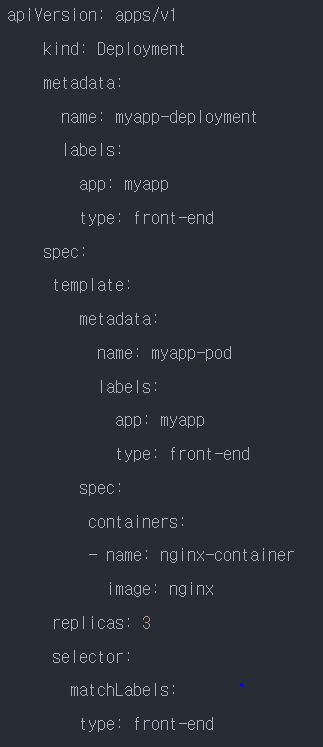
<Deployment 관련 commands>
- Deployment 생성

-Deployment 생성 확인

-Deployment를 만들면 Replicaset이 자동 생성

-ReplicaSet은 파드를 만듦

-모든 object 확인

32강
Certification Tip!
https://kubernetes.io/docs/reference/kubectl/conventions/
kubectl Usage Conventions
Recommended usage conventions for kubectl. Using kubectl in Reusable Scripts For a stable output in a script: Request one of the machine-oriented output forms, such as -o name, -o json, -o yaml, -o go-template, or -o jsonpath. Fully-qualify the version. Fo
kubernetes.io
Create an NGINX Pod
kubectl run nginx --image=nginx
Generate POD Manifest YAML file (-o yaml). Don't create it(--dry-run)
kubectl run nginx --image=nginx --dry-run=client -o yaml
Create a deployment
kubectl create deployment --image=nginx nginx
Generate Deployment YAML file (-o yaml). Don't create it(--dry-run)
kubectl create deployment --image=nginx nginx --dry-run=client -o yaml
Generate Deployment YAML file (-o yaml). Don't create it(--dry-run) with 4 Replicas (--replicas=4)
kubectl create deployment --image=nginx nginx --dry-run=client -o yaml > nginx-deployment.yaml
Save it to a file, make necessary changes to the file (for example, adding more replicas) and then create the deployment.
kubectl create -f nginx-deployment.yaml
OR
In k8s version 1.19+, we can specify the --replicas option to create a deployment with 4 replicas.
kubectl create deployment --image=nginx nginx --replicas=4 --dry-run=client -o yaml > nginx-deployment.yaml
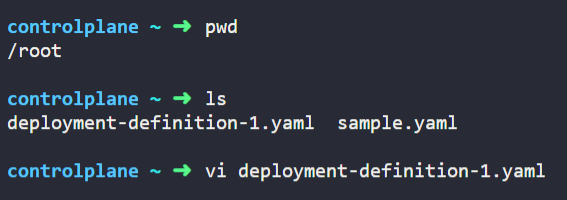
33-34강 실습
35강
Services
- Pod는 특성상 생성될 때마다 내부 IP 주소가 계속 변화함 (일회성 자원)
- 쿠버네티스 환경에서 서비스는 이러한 Pod에 탑재된 애플리케이션이 외부와 상호통신이 가능하도록 만들어 줌
- 애플리케이션을 다른 응용 프로그램 사용자와 연결하는데 도움이 됨
- 백엔드와 프런트엔드 pod간의 통신을 도움
- 느슨한 결합을 가능하게 함
- 외부 사용자가 웹 페이지에 access하는 방법
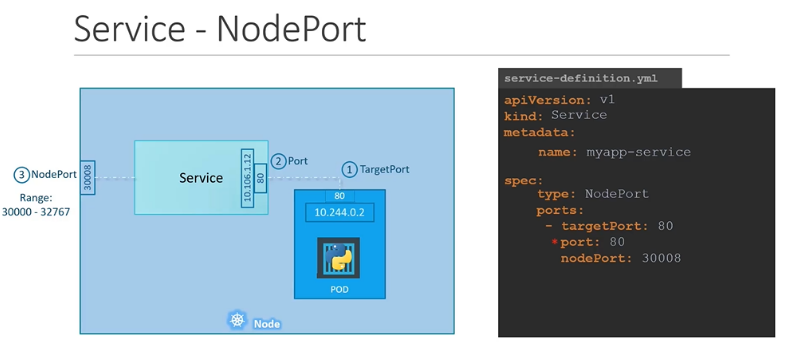
<서비스 정의 및 생성>
spec.ports 아래 2개의 포트 지정
- targetPort: 파트듸 애플리케이션 쪽에 열려있는 포트를 의미
-> 서비스로 들어온 트래픽은 해당 pod의 <클러스터 내부 IP>:<targetPort>로 넘어가게 됨
- port: 서비스 쪽에서 해당 pod를 향해 열려있는 포트 의미
<서비스 유형>
1.ClusterIP (기본형태)
- Pod들이 클러스터 내부의 다른 리소스들과 통신할 수 있도록 해주는 가상 클러스터 전용 IP
- 오직 클러스터 내부에서만 접근 가능
2.NodePort
- 웹 애플리케이션을 실행하는 pod의 포트에 연결함
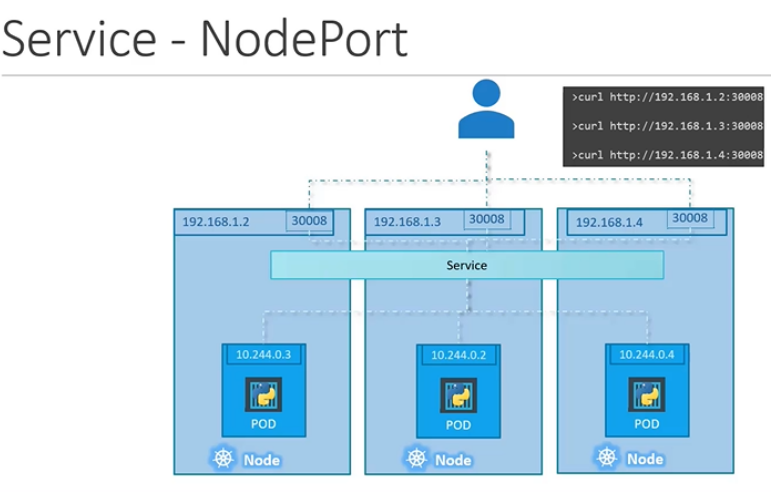
- 외부에서 Node IP의 특정 포트 (<NodeIP>:<NodePort>)로 들어오는 요청 감지
- 해당 포트와 연결된 pod로 traffic 전달하는 유형의 서비스
- 내부로 들어온 traffic을 특정 pod로 연결하기 위한 ClusterIIP 자동 생성
3.LoadBalancer
- 별도 외부 로드 밸런서를 제공하는 클라우드(AWS, Azure, GCP 등) 환경을 고려하여 해당 로드 밸런서를 클러스터의 서비스로 프로비저닝할 수 있는 유형 제공
- NodePort와 ClusterIP 자동 생성
4.ExternalName
- 서비스에 SELECTOR 대신 DNS Name을 직접 명시하고자 할 때 사용
<IP>
-노드 ip:192.168.1.2
-노트북 ip: 192.168.1.10
-내부 pod 네트워크는 10.244.0.0범위
pod id: 10.244.0.2
192.168.1.2에 curl을 하면 가져옴
10.244.0.2로 접근 불가
서비스는 pod, rs 또는 deploy 마찬가지로 개체임

<멀티 포트 지원>
- 서비스는 동시에 하나의 포트 뿐 아니라 여러개의 포트를 동시에 지원할 수 있음
- 웹서버의 http와 https 포트가 대표적
예시)
apiVersion: v1
kind: Service
metadata:
name: hello-node-svc
spec:
selector:
app: hello-node
ports:
- name: http
port: 80
protocol: TCP
targetPort: 8080
- name: https
port: 443
protocol: TCP
targetPort: 8082
type: LoadBalancer
참조: https://tecoble.techcourse.co.kr/post/2021-11-07-load-balancing/
로드 밸런싱에 대해 알아보자!
…
tecoble.techcourse.co.kr
https://muni-dev.tistory.com/m/65
Udemy CKA 강의 정리 28: Recap - ReplicaSets
해당 내용은 Udemy의 Certified Kubernetes Administrator (CKA) with Practice Tests 강의를 공부한 내용입니다. 내용을 그대로 번역하기보다는, 제가 이해하기 쉬운 대로 수정한 부분들이 있습니다.⚠️ 영어 독
muni-dev.tistory.com
Udemy CKA 강의 정리 31: Deployments
해당 내용은 Udemy의 Certified Kubernetes Administrator (CKA) with Practice Tests 강의를 공부한 내용입니다. 내용을 그대로 번역하기보다는, 제가 이해하기 쉬운 대로 수정한 부분들이 있습니다.⚠️ 영어 독
muni-dev.tistory.com
https://seongjin.me/kubernetes-service-types/
쿠버네티스에서 반드시 알아야 할 서비스(Service) 유형
파드는 특성상 생성될 때마다 내부 IP 주소가 계속 변화하게 된다. 쿠버네티스의 서비스(Service)는 이러한 파드에 탑재된 애플리케이션이 외부와 상호 통신이 가능하도록 만들어준다. 이번 글에
seongjin.me
쿠버네티스 #7 - 서비스 (Service)
쿠버네티스 #7서비스 (service) 조대협 (http://bcho.tistory.com) Service쿠버네티스 서비스에 대해서 자세하게 살펴보도록 한다.Pod의 경우에 지정되는 Ip가 랜덤하게 지정이 되고 리스타트 때마다 변하기
bcho.tistory.com

