
푸잉이의 기술블로그
[Day11] Certified Kubernetes Administrator (CKA) with Practice Tests 본문
[Day11] Certified Kubernetes Administrator (CKA) with Practice Tests
data고수 2023. 1. 17. 02:38129강. Backup and Restore Methods
<Backup-Resource Configuration>
application을 exposing하기 위해
-> kubectl create namespace new-namespace
-> kubectl create secret
-> kubectl create configmap
----------------------
pod-definition.yaml 만들고 난뒤,
kubectl apply -f pod-definition.yaml (declarative approach)
=> 선호되는 방법
kubectl을 이용해 kube-apiserver에 물어봄 -> 모든 resource configuration을 저장함
e.g.) velero
<Backup-ETCD>
Cluster의 상태를 저장함
Cluster 내에서 생성된 node 및 모든 resource가 etcd에 저장
etcd 서버 자체를 백업
ectd는 master node에서 호출됨
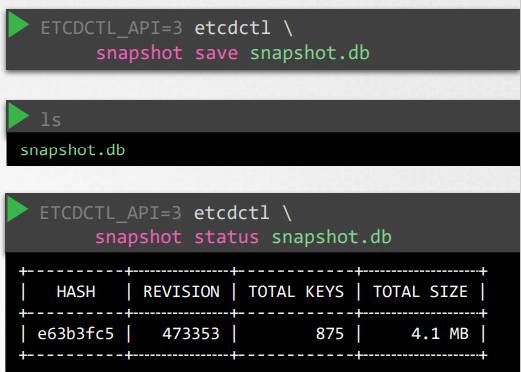
snapshot solution
사진 설명
-snapshot save command를 사용하여 etcd database의 snapshot 저장
-ls -> current directory
-status-> 다른 장소에 생성하고 싶을 때 사용
<Restore-ETCD>

130강. Working with ETCDCTL
etcdctl is a command line client for etcd.
export ETCDCTL_API=3
if you want to take a snapshot of etcd,
etcdctl snapshot save -h (Mandatory global options)
Since our ETCD database is TLS-Enabled, the following options are mandatory:
--cacert verify certificates of TLS-enabled secure servers using this CA bundle
--cert identify secure client using this TLS certificate file
--endpoints=[127.0.0.1:2379] This is the default as ETCD is running on master node and exposed on localhost 2379.
--key identify secure client using this TLS key file
Section 7: Security
138강. Kubenetes Security Primitives
go-to platform (hosting production에 가장 많이 사용하는 platform)
kube-apiserver
1. who can access?
files- username and password
files- username and tokens
certificates
external authentication providers-LDAP
service accounts
2. what can they do?
RBAC authorization
ABAC Authorization
Node Authorization
webhook mode
-쿠버네티스는 사용자가 제어하는 인증기관 (CA)에서 서명한 TLS 인증서를 프로비저닝할 수 있는 API 를 제공
-CA 및 인증서는 워크로드 간의 신뢰 관계를 구성하는 용도로 사용 가능
139강. Authentication
리소스 사용자
admins, developers, end users, bots
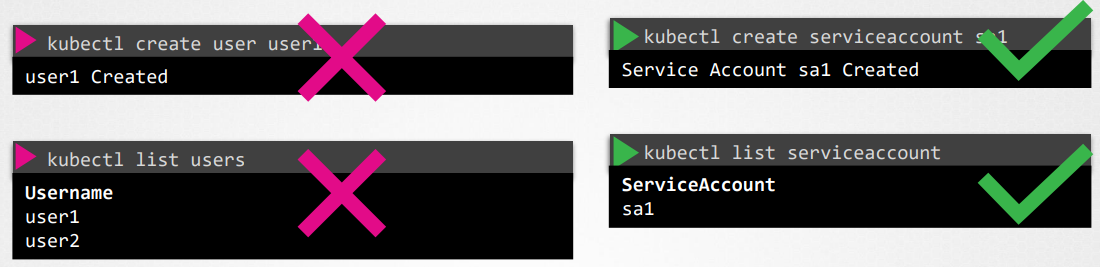
모든 유저들은 API Server에 의해 관리. (admins: kubectl/ developers: curl https://kube-server-ip:6643/)
<Auth Mechanisms>
(권장 x)
Static password File
- authenticate user
-> curl -v -k https://master-node-ip:6443/api/v1/pods -u "user1:password123"
Static Token File
Certificates
Identify Services
-> volume mount를 고려해라, kubeadm setup 에서 auth file을 제공하는 동안
143강. TLS Basics
-ssh 또는 web werver를 보호하기 위해 인증서를 구성하는 방법
인증서는 trasaction (거래) 중 두 당사자 간의 신뢰를 보장하는데 사용됨
-> 사용자가 웹 서버에 액세스할 때, TLS인증서는 사용자와 서버 간의 통신이 암호화되고 서버가 누군지 확인함.
(SNIFFING 방지)
ASYMMETRIC ENCRYPTION (비대칭암호화)
-Private Key(오직 나만), Public Lock (누구든 access 가능)
- ssh-keygen
-> id_rsa (private key) id_rsa.pub (public lock)
서버가 public lock이라도 key 가 없기 때문에 access 할 수 없음
1. 유저가 서버로부터 public key 가져옴
2. 유저가 서버로부터 받아온 public key를 이용해 private key 암호화
3. 암호화된 유저의 private key를 서버로 보냄
(해커가 private key 가져갈 수 있지만 해독 불가)
4. 서버는 암호화된 private key를 해석해서 유저의 private key로 획득
5. 유저와 서버는 통신에 필요한 대칭키를 해커의 위험으로부터 안전하게 확보
6. 유저와 서버는 대칭키로 통신
해커가 가짜 backing site 만들어서 접속 유도
-> certificate에 누가 싸인했는지, 발행했는지 구별 => 합법적인 인증서
Certificate Authority (CA) 잘 알려진 조직들, 싸인해주고 인증서를 확인해 줌 (symatec, digicert, comodo, globalsign)
oepnssl req -new -key my-bank.key -out my-bank.csr
-subj "/C=US/ST=CA/O=MyOrg, Inc./CN=mydomain.com"
-> It is the certificate signing request that should be sent to the CA for signing.
해커는 validate information에서 X -> 실도메인 소유주인지 확인 하는 검증과정을 통과하지 못함
이렇게 만들어진 서명된 인증서는 브라우저가 신뢰 (Private key-Public lock)
기업 내부망은 적용 x
-> 자체 사설 CA 호스팅 가능
내부서버 -서비스 제공
내부서버 - CA 배포 서버
회사내부 - 모든 직원들의 PC에 CA배포서버 Public Key 넣음
*Certificate Sining Request (CSR)
앤드 유저도 single key 만들어서 사용
서버 -> 클라이언트 누군지 식별 (인증서 요구)
1. 클라이언트가 CSR 생성
2. CA기관에 보내서 서명 받음
3. 서명받은 인증서 서버로 전송
4. 서버는 클라이언트한테 받은 인증서로 식별
*인프라에서 Public key가 핵심
=> Public Key Infrastructure (PKI)
Private key로 암호화-> public key로 해독
public key로 암호화 -> Private key로 해독
certificate은 뒤에 crt 또는 pem 확장자가 붙어 있음
private key의 경우 key가 확장자로 붙거나 파일명에 key가 들어감
참조)


